Cat6 vs Cat7 Cable
Introduction
Cat6 and Cat7 are Ethernet cable categories used for wired networking. Both can connect computers, routers, switches, IP cameras, access points, network storage, and other Ethernet devices. Cat6 is widely used in homes and offices because it offers strong performance for Gigabit networks and can support 10 Gigabit Ethernet over shorter distances. Cat7 was designed with higher-frequency specifications and stronger shielding requirements, making it suitable for certain high-performance and electrically noisy networking environments. However, the cable category should always be considered alongside the capabilities of the network equipment.
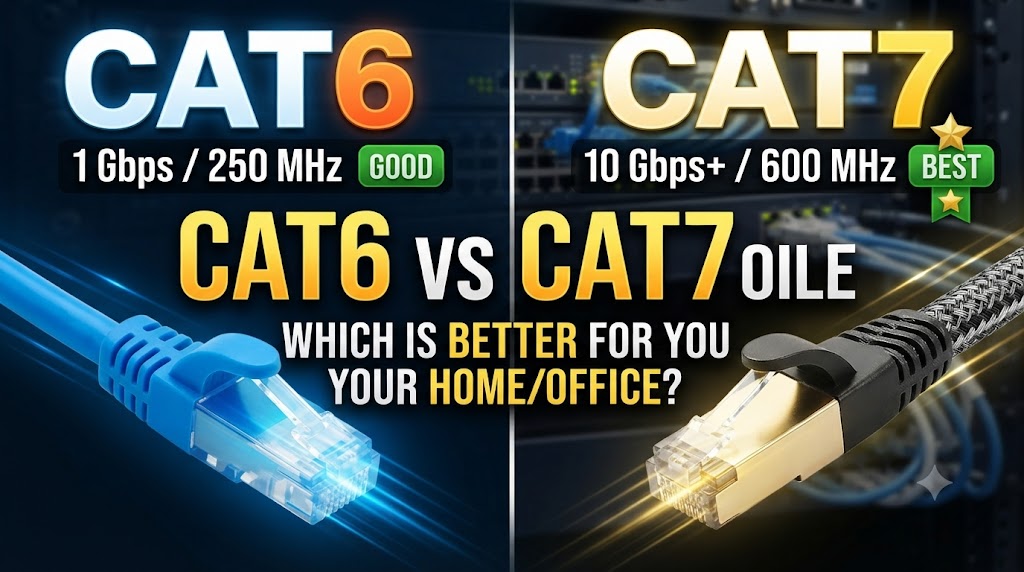
The biggest differences between Cat6 and Cat7 involve frequency rating, shielding, crosstalk control, and 10 Gbps networking capability. Cat6 is rated up to 250 MHz and can support 10 Gbps Ethernet over shorter distances, generally up to 55 meters under suitable conditions. Cat7 is specified up to 600 MHz and is designed for 10 Gbps Ethernet up to 100 meters. Cat7 cables are also commonly shielded, which can provide additional protection against electromagnetic interference when the entire installation is properly grounded.
Quick Comparison Table
| Feature | Cat6 | Cat7 |
|---|---|---|
| Cable Category | Category 6 | Category 7 |
| Frequency Rating | Up to 250 MHz | Up to 600 MHz |
| 1 Gbps Support | Up to 100 m | Up to 100 m |
| 10 Gbps Support | Up to 55 m* | Up to 100 m |
| Shielding | May be unshielded or shielded | Shielded construction is typical |
| Crosstalk Control | Good | Higher specification |
| Installation | Generally easier | Can be thicker and less flexible |
| Cost | Generally lower | Generally higher |
| Home Networking | Suitable | Often more than needed |
| High-Interference Environments | Suitable depending on installation | Can be useful |
*10 Gbps performance over Cat6 depends on cable length and installation conditions.
Cat6 vs Cat7: Speed
Both Cat6 and Cat7 can support 1 Gbps Ethernet up to 100 meters under appropriate conditions.
For 10 Gbps Ethernet, Cat6 can support the speed over shorter distances, while Cat7 is designed to support 10 Gbps up to 100 meters.
However, choosing Cat7 does not automatically make a network faster.
If your router, switch, computer, or network adapter has a 1 Gbps Ethernet port, a Cat7 cable will still operate at the speed supported by the connected equipment.
Which is better for speed?
Cat7 has higher cable specifications, but the actual network speed depends on the complete network.
For a 10 Gbps network with longer cable runs, Cat7 provides more cabling capability than Cat6.
Cat6 vs Cat7: Frequency
Cat6 is rated up to 250 MHz, while Cat7 is specified up to 600 MHz.
The higher frequency specification of Cat7 means that the cable is designed to meet more demanding electrical performance requirements.
However, frequency rating should not be confused with internet speed.
A 600 MHz Cat7 cable does not mean that your internet connection will automatically be faster than a 250 MHz Cat6 connection.
The network equipment and Ethernet standard being used determine the actual data rate.
Cat6 vs Cat7: Shielding
One of the important differences is shielding.
Cat6 cables are available in different constructions, including unshielded and shielded versions.
Cat7 cabling is designed with shielding intended to provide stronger protection against crosstalk and electromagnetic interference.
This can be useful in environments containing electrical equipment, motors, power cables, or other potential sources of interference.
Why does shielding matter?
Shielding can reduce unwanted electrical interference, but it needs to be installed correctly.
A shielded cable does not provide its full intended benefit simply because it has a metal layer. Appropriate shielded connectors and proper grounding are also important.
For an ordinary home installation, this additional shielding may not provide a noticeable advantage.
Cat6 vs Cat7: Crosstalk
Crosstalk occurs when electrical signals from one wire pair interfere with another pair.
Cat7 has more demanding specifications for controlling crosstalk than Cat6.
Its construction and shielding are designed to provide strong isolation between signal pairs.
This becomes more useful in installations where many cables are placed close together or where the surrounding environment produces significant electromagnetic interference.
For a normal home Ethernet connection, however, a properly installed Cat6 cable can already provide very good performance.
Cat6 vs Cat7: Maximum Distance
For Gigabit Ethernet, both Cat6 and Cat7 can support distances of up to 100 meters under standard conditions.
For 10 Gbps Ethernet, Cat7 is designed to support up to 100 meters, while Cat6 is generally limited to shorter distances for this speed.
This makes Cat7 potentially more suitable for longer 10 Gbps links.
The actual result still depends on the cable, connectors, installation, and networking equipment.
Cat6 vs Cat7: Cable Thickness and Flexibility
Cat7 cables are commonly thicker because of their shielding and construction.
This can make them less flexible than many Cat6 cables.
Cat6 is generally easier to route through walls, conduits, cabinets, and other restricted spaces.
When installing Cat7, make sure the cable’s bend radius and installation requirements are suitable for the planned route.
Cat6 vs Cat7: Cost
Cat7 cable is generally more expensive than Cat6.
For a standard Gigabit home network, the additional cost may not provide a practical benefit.
Cat6 can already support Gigabit Ethernet and can also support 10 Gbps over shorter distances.
Cat7 becomes more relevant when the installation specifically requires its higher specifications, shielding characteristics, or longer 10 Gbps capability.
Cat6 vs Cat7 for Home Networks
For most homes, Cat6 is sufficient for:
- Desktop computers
- Laptops with Ethernet
- Smart TVs
- Gaming consoles
- Network storage
- Wi-Fi access points
- Gigabit routers
- Ethernet switches
- IP cameras
Cat7 can also be installed in a home, but its higher specifications may not be necessary for a typical Gigabit network.
If you are installing new permanent cabling, Cat6 or another suitable modern Ethernet category may provide a more practical balance between performance, installation, and cost.
Cat6 vs Cat7 for CCTV
Both Cat6 and Cat7 can be used for IP CCTV networks.
Cat6 is commonly suitable for Gigabit PoE networking and many IP camera installations.
Cat7’s shielding can be useful in environments where electromagnetic interference is a concern. However, the benefits depend on proper installation and grounding.
For CCTV, cable category alone does not determine video quality. Camera resolution, compression, bitrate, switch capacity, PoE requirements, recorder performance, and network configuration also matter.
Cat6 vs Cat7 for Gaming
Cat6 is already capable of supporting the wired speeds used by many gaming systems.
Moving from Cat6 to Cat7 will not automatically reduce ping or increase gaming performance.
Latency depends on factors such as the internet connection, network equipment, server location, routing, and network congestion.
Cat7 may make sense when the network is being built around higher-speed Ethernet or when shielding is useful, but it is not automatically necessary for gaming.
Cat6 vs Cat7: Compatibility
Cat6 and Cat7 cables can be used with common Ethernet networking equipment, but the exact connector and termination system should be checked.
A cable with a higher category rating does not upgrade the Ethernet port itself.
For example, connecting a Cat7 cable to a 1 Gbps Ethernet port will not turn that port into a 10 Gbps port.
The complete connection must support the desired Ethernet standard.
Cat6 vs Cat7: Which One Should You Choose?
Choose Cat6 if:
- You need a reliable Gigabit network.
- You want 10 Gbps over shorter cable runs.
- You are installing a typical home or small-office network.
- You want easier cable installation.
- You want to keep cabling costs lower.
Choose Cat7 if:
- You specifically need 10 Gbps over longer cable runs.
- The installation has significant electromagnetic interference.
- Shielding is important for your network design.
- You are building a network where Cat7’s specifications are actually required.
- The additional cable and installation cost is acceptable.
Overall Winner: Depends on Your Needs
Cat6 and Cat7 are designed for different levels of networking requirements.
Cat6 is a practical choice for many homes, offices, gaming setups, and CCTV networks because it provides strong performance without the additional complexity and cost of higher-category cabling.
Cat7 offers higher frequency specifications and stronger shielding characteristics and can support 10 Gbps Ethernet over longer distances.
For a standard home or office Gigabit network, Cat6 can be sufficient. For a specialized high-performance installation where shielding or longer 10 Gbps links are important, Cat7 may be more appropriate.
Conclusion
Cat6 and Cat7 can both provide reliable wired networking, but Cat7 offers higher frequency specifications and more extensive shielding. Cat6 is generally easier to install and less expensive while already supporting Gigabit Ethernet and 10 Gbps Ethernet over shorter distances.
The important point is that a higher-category cable does not automatically make the entire network faster. Routers, switches, network adapters, connectors, cable length, installation quality, and the Ethernet standard supported by the devices all affect the final result.
For most standard home and small-office networks, Cat6 can provide the necessary performance. Cat7 becomes more useful when the network has specific requirements for higher specifications, shielding, or longer 10 Gbps connections.
Disclaimer
Ethernet performance can vary according to cable construction, cable length, connectors, grounding, installation conditions, network equipment, and the Ethernet standards supported by connected devices. Cat7 installations may require appropriate shielded components and grounding to achieve the intended shielding benefits. Always check the specifications of the actual cable and networking equipment before purchase or installation.